
We have put a lot of thought (and code) into this new pricing type since the announcement a week ago.
Here’s an update in the form of a video (🙈):
We also updated the docs page to include the new pricing type.
Coming soon!
We have put a lot of thought (and code) into this new pricing type since the announcement a week ago.
Here’s an update in the form of a video (🙈):
We also updated the docs page to include the new pricing type.
Coming soon!
—
by
We’re working on a new pricing type to allow for volume pricing when selling images in picu Pro.
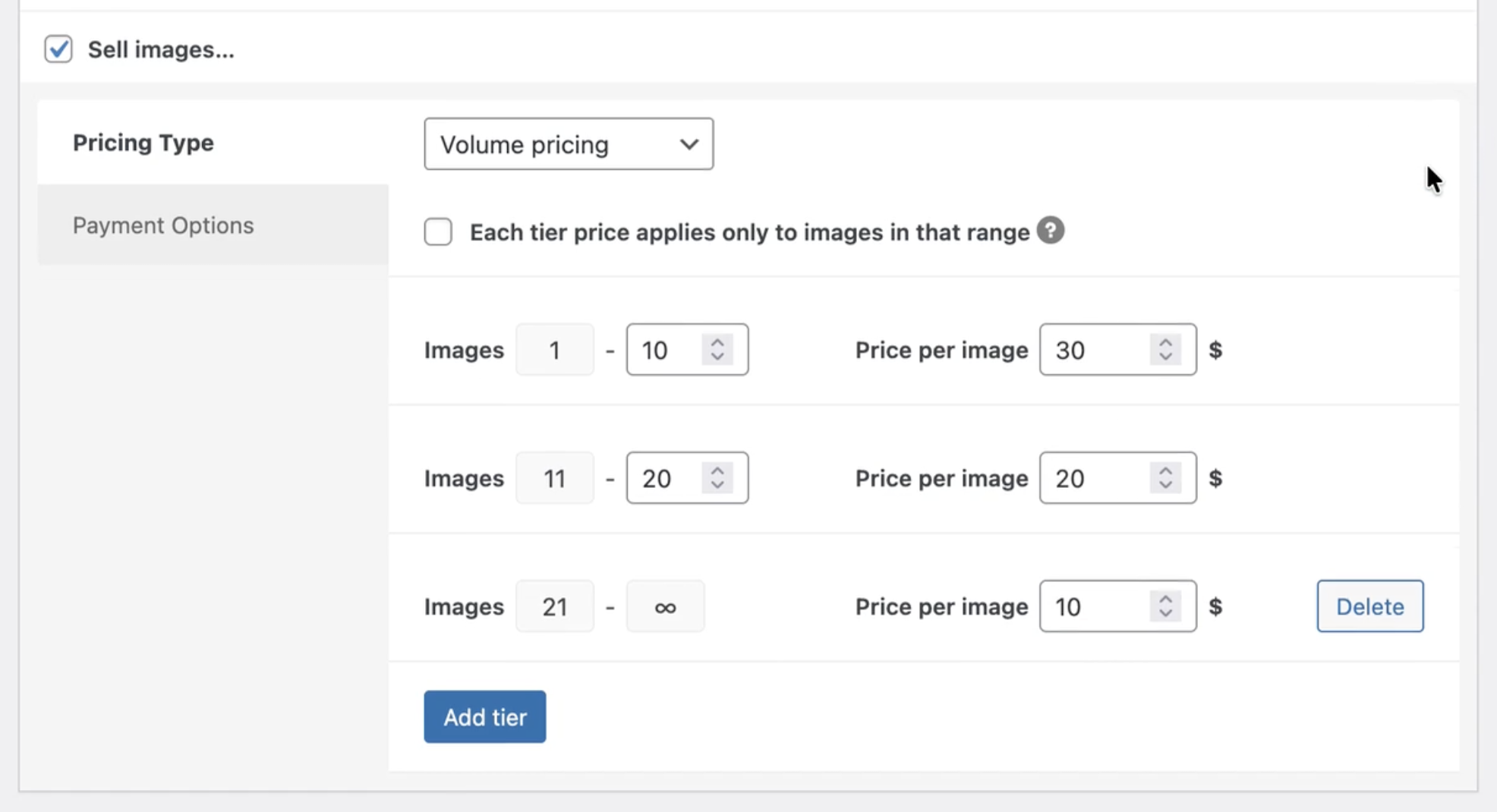
Volume pricing will let you set different prices for clients ordering multiple images at once. This is a great way to encourage your customers to purchase more and increase sales, while giving them something back in return.
Here’s the current state of our implementation so far (work in progress):
With the upcoming picu Pro 2.3.0 release clients will see an order status notification above their collection.
Order pending:

Completed order, which also contains a link to the invoice:

The invoices functionality can be disabled.
Failed order:

We also added the possibility for the client to return to checkout and place the order again. The client could also choose a different payment method, e.g. if their first choice didn’t work for them.
We also added a new filter picu_pro_order_status_notification, so the status message can be completely customized:
add_filter( 'picu_pro_order_status_notification', function( $message, $order_id ) {
    $status = get_post_status( $order_id );
    if ( $status === 'pending' ) {
        $message = '<span class="order-status__message">We are still waiting for you the send over the money!</span>';
    }
    return $message;
}, 10, 2 );With picu Pro version 2.0 we introduced e-commerce features to sell images directly to clients using your proofing galleries.
So far, we support Stripe and PayPal (since last week) for digital payments or bank transfer as a manual payment option.
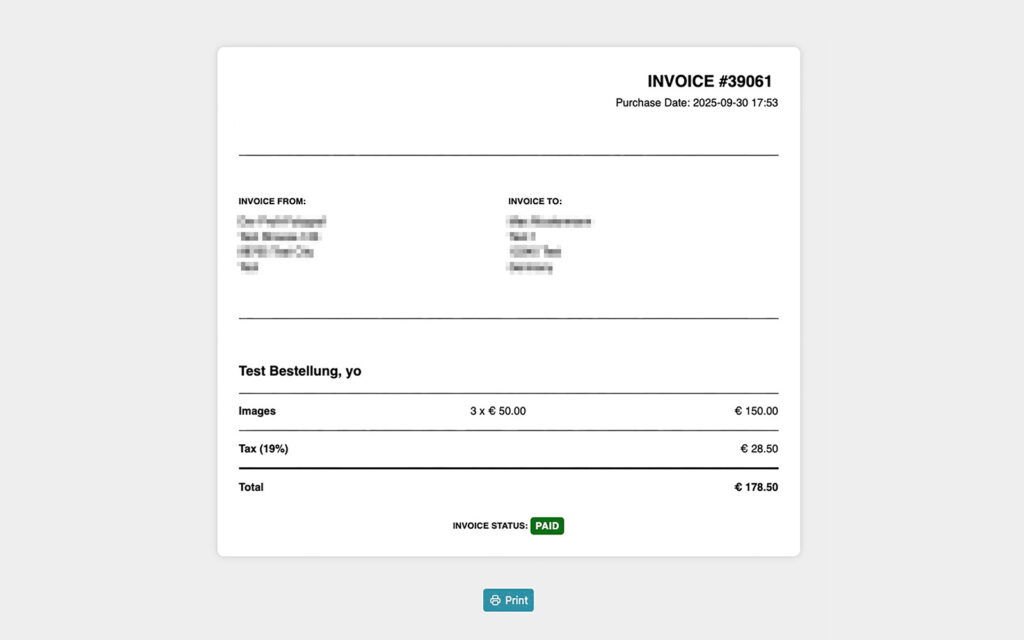
With the upcoming release that we’re working on right now, we’re adding professional invoices for your clients, that they can download and/or print on their own for each of their orders.
Here’s a quick preview of what that will look like:
Stay tuned! ✌️
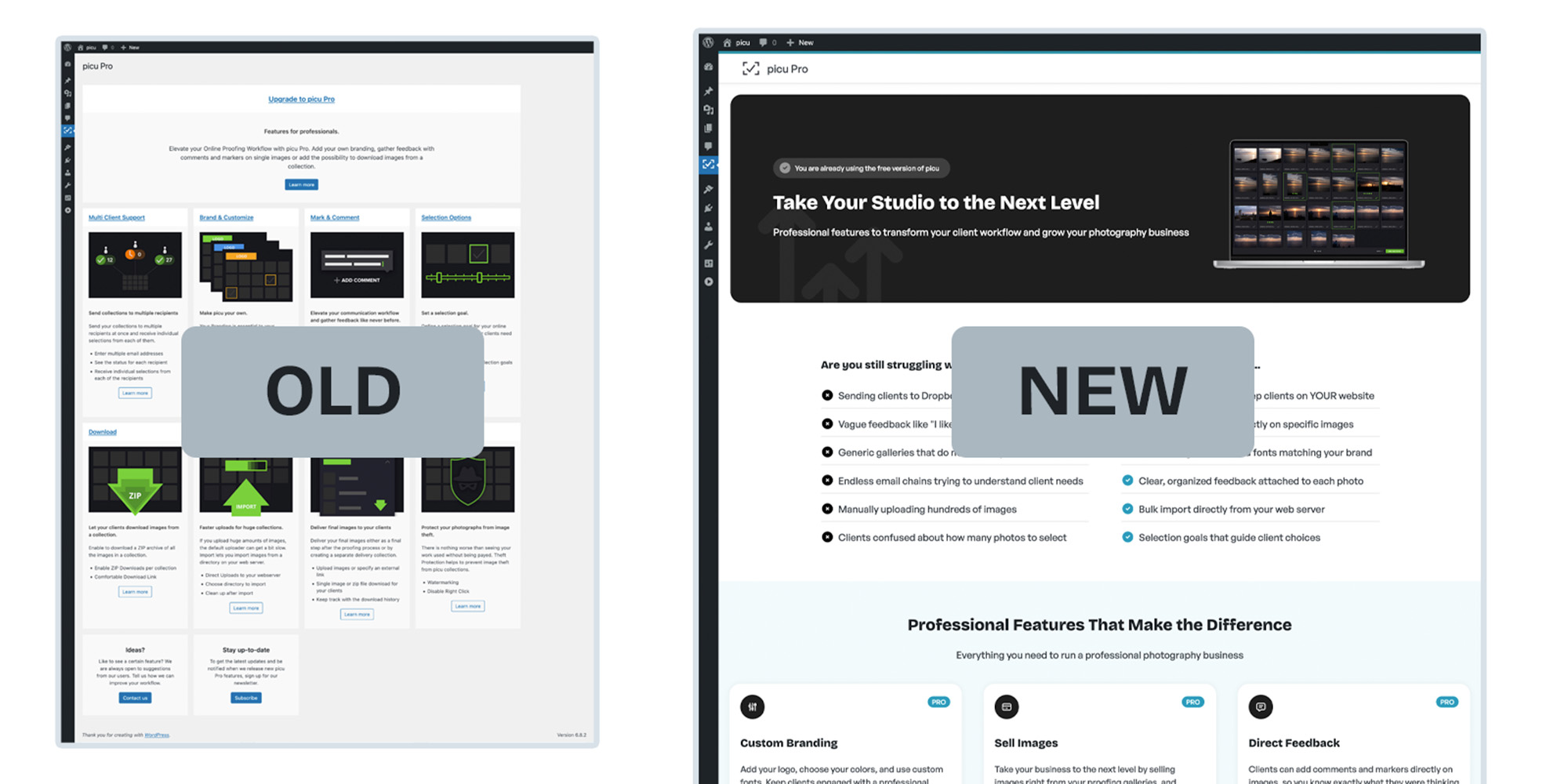
We updated the pro upsell page inside our free picu plugin to better reflect what picu Pro has to offer.
The old site was still from a time when we offered separate modules with pro features that you would buy on their own. A lot has happened since, the modules got bundled and later fused together to form today’s single picu Pro plugin and many of the newer features were never mentioned at all.
With the most recent picu update to 3.2.0, we finally rolled out a new design and completely rewritten content, to better communicate what picu Pro is all about.
Here’s an overview of the things we changed.
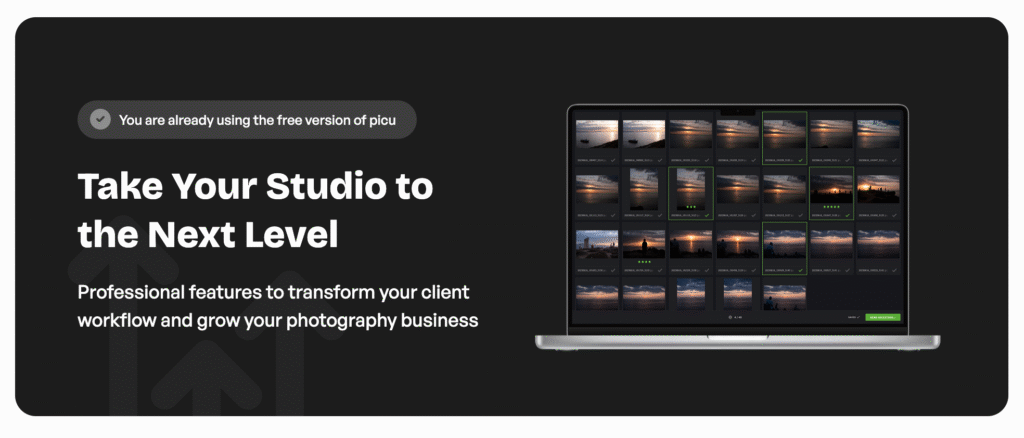
The site now matches the design of our still new-ish website that we launched last year. A new header/hero element draws attention to what picu Pro is all about and the screenshot on the side gives a glimpse of how some of the pro features look like.
In the next section, we highlight some of the problems that picu Pro solves for photographers, as well as their solution to the right.
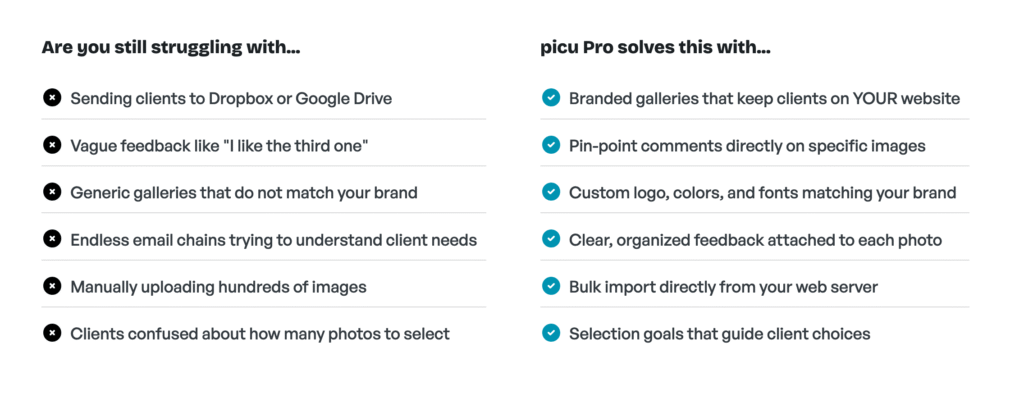
While talking benefits and problems solved is great, we still wanted to mention some of the most important features in picu Pro to give you an overview of what picu Pro gets you.

Right before the final call to action, we added some of the lovely testimonials we got from our clients, to add some social proof.

And last but not least, there’s a call to action to check out picu Pro on our website – and hopefully upgrade from there.

About two weeks ago, we started receiving a few reports about compatibility issues with the Rank Math SEO Plugin when picu and/or picu Pro were activated as well.
The reports mentioned that some of the Rank Math settings pages could not be accessed and/or saved anymore.
We started to investigate and found a small but important bug in the function that excludes our picu post types from Rank Math.
A bugfix release for picu – version 3.0.4 – has just been published, which fixes these issues. Install it now, especially if you are using Rank Math.
Thanks to Rank Math support for their help in resolving this, and to everyone who reported it!
—
by
A month ago we wrote about our plans on how to support taxes in picu E-commerce. The development of this turned out do be much less straightforward and took a lot more time than we anticipated, which is why we weren’t able to release Alpha-3 as planned. In this post we’d like to give an overview of the current status.
Some countries, like Germany, have very strict laws about E-commerce. For example: If you sell to end-consumers directly, all prices must be displayed including taxes, which wouldn’t be that hard to do if you serve only Germany, but what about photographers that work internationally and need to support different tax rates? We quickly realized that to properly support this, we would need one (or a combination of) the following:
We want to make this as frictionless as possible for clients, which is why the last one – Geolocation by IP – is our most favorable option but as this will take a moment to develop, we needed a workaround that will work right now.
For now, and to not further delay our progress, we decided to simplify the settings for taxes and removed the option so select how to show prices in the frontend and for now will only keep the setting on how to enter prices – including or excluding taxes.

If you activated taxes and entered prices without taxes, we will add “+ Taxes” in the frontend to notice the customer that taxes will be applied during checkout. And finally in the checkout, when the customer was able to chose their country, the exact tax will be calculated and displayed.

If you are in Germany and must display prices including taxes, you can switch the setting to enter full prices including taxes and the prices will be calculated the other way around to display them correctly as well.
There are still things that can be enhanced in the future, but this should be working in a lot of different scenarios already.
Last month, we got a support request about some problems when deleting picu collections. We were able to identify that the problems occurred only when WPML and their WPML Media Translations extension were active, so we contacted their support and started investigating ourselves.
Together with their development and partnerships team, we were able to quickly identify the issue and created a fix that is in testing stage right now and should be ready for the next release.
Early in March we got notified by a user that there were some problems displaying images in their collections.
When we looked into this, we identified that the problem was an incompatibility when the SiteGround Speed Optimizer plugin was active, or specifically a feature that minifies and combines JavaScript files in the frontend, which got in the way with how we load some of our scripts.
Usually, if there is a problem between picu and a caching plugin the first and best thing you can do is turn off ALL minification/combination of JS, CSS or caching options for our specific custom post type picu_collection, if possible.
In this plugin there is no such option to date, which we reported back to the development team at SiteGround, but luckily we also found and implemented a workaround that fixes this from 2.5.3 onwards!
Taxes are an important – and in many cases legally required – part of most online businesses. As we know this will be an important feature for many of you, we want to make sure that picu properly supports taxes, right from the start. Here’s a quick update on where we are right now.
In the new e-commerce settings in picu, you will be able to activate taxes for your store:

Once activated, you can add all the tax rates that you’ll need – depending on the countries you sell into:

And finally, the calculated taxes will show up in the “checkout” modal for the client:

Ok, this is it for now. We expect to ship this to our pool of beta testers next week with Alpha 3, and plan for a public release soon!
If you have any feedback, wished or thoughts about this, please feel free to get in touch with us – we’d love to hear from you!
With our next picu release 2.5.0 it will be possible to use some formatting in client emails using Markdown:

This is what it looks like when receiving the email:

Of course Markdown can also be used in email templates, which are part of picu Pro:

Read more about what you can do with Markdown in our How-To article.
We shared our last status update back in December, which showed mostly what our e-commerce integration looks like from a client’s perspective.
Today I want to share a little bit more about the backend side of things, what the photographer gets to interact with in the WordPress Admin.
1. Selling images can be activated per collection.
We are starting with two pricing types: Single image pricing and package pricing.

2. We also integrated the first payment provider (Stripe), which you can also turn on/off per collection under “Payment Options”:

There will be more provider integrations in the future.
3. Once an order has been placed it can be viewed in the newly added order overview:

4. And of course, you can look at individual orders as well:

We will release the current state as an early alpha version to our beta testers soon.
Next up: Taxes, invoicing and PayPal integration. Stay tuned! 🙂
We announced our plans for an e-commerce integration for picu back in August, and today I’ll share some of our progress.
On the frontend, the interface photographers’ clients see when ordering images through picu, we prioritize simplicity and ease of use and we continue to do so when selling images.
The total price will be displayed in the lower right and is continuously updated while images are being selected:
We already implemented two of the most requested pricing models: Single image (as seen above) and package pricing.
When selling images, the default approval form with a comment box is replaced with checkout fields like name and address, as well as a table that summarizes the order. All those fields will be fully customizable (they are already, actually).
In the follwoing example we used packaged base pricing calculation with a number of included images and extra cost for additional images:
On the backend, we implemented some basic e-commerce settings:

Next time I’ll share the pricing model options and tell you about Stripe integration. 🙂
With our Collection List Shortcode it was possible to display a list of collections anywhere on your site, which was mostly used to build a “Client Area” page for clients. This worked well and even allowed for some customizations like querying for client email addresses, post status (sent, approved etc.) or specific collections by ID that you want to display.
Yet, in the modern WordPress world where everything is made of blocks, using shortcodes felt more and more antiquated and it was time to rebuild this as a custom block.
So during the last few months or so, we spent some time on and off working on a new block to ultimately replace the old shortcode. The new block will allow the same or better level of customization, but will be much easier to configure in the backend, as you would expect from a WordPress block.
Here’s a sneak peak of how this will look like in the backend:

On the frontend side of things, the lists so far looks similar compared to the shortcode and we might add a few small enhancements until release.
Right now, there are only a handful of small bugs to fix before this will be ready for release, so you can definitely expect this to be available in one of the next updates!
—
by
It is already over – at least this time around – but I thought it might be interesting to show, how we handle our Black Friday sale in our store. (We use Easy Digital Downloads to handle Subscriptions and Licensing for picu Pro.)
We use a regular EDD coupon for Black Friday, which is set to be active for a pre-defined timeframe, and we automatically apply it on checkout.
To activate Black Friday, we created a couple of custom settings:

This is the (simplified) code we use to automatically apply a EDD coupon on checkout:
/**
 * Automatically apply EDD coupon code on checkout
 */
function maybe_apply_discount() {
    if ( get_option( 'picu_black_friday' ) == 'on' && time() < strtotime( get_option( 'picu_black_friday_end_date' ) ) + 86400 ) {
        $discount_code = get_option( 'picu_black_friday_coupon' );
        $cart_items = edd_get_cart_contents();

        // Make sure there is a coupon and picu Pro is in the cart
        if ( ! empty( $discount_code ) && is_array( $cart_items ) ) {
            foreach ( $cart_items as $item ) {
                if ( $item['id'] == 1234 ) {
                    $has_picu_pro = true;
                }
            }
        }

        // Apply or remove the coupon
        if ( $has_picu_pro == true ) {
            edd_set_cart_discount( $discount_code );
        } else {
            edd_unset_cart_discount( $discount_code );
        }
    }
}

add_action( 'edd_cart_items_before', 'maybe_apply_discount' );
Aside from checking the aforementioned options, we also make sure that picu Pro is actually in the cart, defined by ID 1234 in the example above.
Before switching to a FSE theme, we used the same mechanics directly in our PHP theme templates to display the Black Friday banners on the site.
This time around we switched to synced patterns, which makes it much easier and quicker to update the banners, as we can do it without updating the theme itself.

We used the Block Visibility plugin to show the banners during the time of the deal.

This setup works quite well for us and it only needs very little effort to setup every year.
—
by
A couple of weeks ago I shared a post showing the early stages of our star rating & filter implementation.
This is a follow up post, showing the current and final implementation – at least for the upcoming picu Pro release.
I think we made some great improvements:
Stars can also be changed in the lightbox view:
Besides clicking on the star rating you can also use your keyboard by typing a number between 1 and 5 to change the star rating.
Star rating & filter will be a Pro feature and we are very excited for this update!
Not an email you want to get on a Saturday:

Turns out, when we refactored our settings, we changed the “Show picu love” setting to “on” by default. The WordPress.org guidelines however state, that “Plugins may not embed external links or credits on the public site without explicitly asking the user’s permission“.
Fortunately – thanks to how picu settings work – it was a very quick and easy fix:

Until now filtering images in a collection was only possible between “selected” or “unselected”.
I wanted to make this more flexible and landed on star rating/filtering.
Star ratings are pretty common and universally understood, although the usual use case is rating products or movies. Still, the concept remains the same: More stars mean “better”. Also, photo management software like Adobe Lightroom have supported star ratings basically forever.
This will make the selection process much more flexible, especially when dealing with lots of images. For example, it will allow making multiple selection rounds, assigning one star in the first round, two in the next, etc., ending up with a final selection which can then actually be selected – and sent to the photographer.
Below you can see a video of the current implementation of star ratings for individual images and the filter:
Please note, that this is still in early stages, so the implementation will probably change for the final release.
With picu 2.3.0 and picu Pro 1.4.0 collections do no longer close automatically. Before collections would close once the last client approved their selection. With the introduction of client (self) registration, this no longer made sense.
We still wanted to make it easy for the photographer to close the collection once everyone is done.
So we added a new “Close Collection” button to the notification email, that the photographer gets, when a client approved a collection.
This button will only be added once the last client has approved their selection.
And this is what it looks like:

The button will be part of the picu Pro 1.4.8 release.
picu collections are never meant to be public, that is why we remove them from XML sitemaps, have robots meta directives set to noindex, etc..
(Short excursion: For various reasons we cannot set our collection post type to ‘public' => false, because they are public, as in they need to be displayed in the front end – just not for everyone.)
We try to support the most common SEO plugins. And by support I mean, make sure that users do not accidentally add their collections to search engines.
We implemented this for the Yoast SEO plugin a long time ago, but until now our custom post type still showed up in the Yoast settings. The settings for picu collections didn’t do anything, but they were still visible, which made it confusing for our users. (I even created an issue on GitHub years ago.)
We recently found this new filter wpseo_indexable_excluded_post_types, which not only allows us to excludes picu collection from being indexed by Yoast, it finally also did the trick of removing collection from the Yoast settings. 🥳
This is the code we used:
/**
 * Exclude collections from Yoast SEO indexable creation.
 *
 * @since 2.3.6
 *
 * @see https://developer.yoast.com/features/indexables/indexables-filters/#post_types
 *
 * @param array $excluded Array of excluded post types by name.
 * @return array The filtered post types.
 */
function picu_do_not_create_indexables_for_collections( $excluded ) {
	$excluded[] = 'picu_collection';
	return $excluded;
}

add_filter( 'wpseo_indexable_excluded_post_types', 'picu_do_not_create_indexables_for_collections' );With picu Pro you can add markers and comments to individual images.
We now also display the date, of when the comment was made.
This is what it looks like in the frontend:

Backend:

This is only the very first step to enable a more interactive workflow. The goal is to allow a back and forth of messages, discussing individual images between client and photographer – and finally between several different clients as well.
With picu Pro you can set a selection goal, so either the exact, minimum, maximum or inside a specific range of the number of images your clients need to select.
Until now, the goal was communicated in the email or the info panel, but there was no clear indication during the selection process. Only when the user wanted to approve the collection, did picu display an alert:

From a user perspective this could be a bit frustrating, especially if they didn’t fully read the email and just now learned about the number restriction.
So, we wanted to add an indicator, when the current selection wasn’t hitting its intended target.
We decided to go with a very minimal, unintrusive, yet visible icon.
Claudio’s sketch:

When implementing it, I added a slight animation, when the indicator is first shown:
Once the goal is reached, the alert is hidden:
We hope this will mitigate a possible source of frustration when making a selection.
About a month ago, we announced that we will be working on adding e-commerce functionalities to picu in some form or another, and created a quick survey to learn more about how our customers would actually want to use this in the real world.
We got a lot of answers and some really great ideas back in return, and wanted to share a quick update on the current status, what we learned and what decisions we made so far.
Some quick facts from the survey:
As for the detailed workflows, we left the question intentionally wide open to get a better picture of what people envision when they think of selling images.
What stuck out the most, is that the actual payment functionality and extended shop settings seem to be a nice bonus for many but the most important step is communicating prices to clients and make them aware what options they have. This came as a little bit of a surprise but – together with the numbers above about existing shop usage – gave us a much clearer picture of what we should build first.
So, here’s what we decided to tackle first:
This functionality will cover a lot of ground and will allow our customers to sell images through picu, but we’re not going to stop there. Technically, this will just be a first stepping stone in the direction of more extensive e-commerce integrations.
To make sure we get this right, we plan to release a beta version first to let a few people test this properly, for which some of you already volunteered (thanks everyone!). If you would like to be added to our pool of beta testers, please get in touch.
I worked on improving a particular function on the collection edit screen: Adding a client to an open collection.
This is what the previous modal looked like:

This is the new version:

I updated this dialog with the following features:
I also made the checkbox somewhat dynamic, by only allowing it to be checked, if the email field is not empty:

(Could be improved by checking if the input is actually a valid email address.)
—
by
Yesterday we sent out a newsletter asking for feedback from our users about e-commerce integration into picu.
Selling images directly through picu, as part of the proofing workflow, has been one of the most requested features and we feel like it is finally time to get to work on it.
But we want to make educated decisions on which features make the most sense for the majority of our users – hence, the survey.
So if you are a picu user and have a specific workflow in mind, please fill out the survey, and let us know! Cheers!
PS: Quick note, because it came up in some of the survey replies already: The existing, easy-to-use proofing workflow will always be the core of picu. E-commerce will extend the workflow for photographers who need/want it. If proofing is everything you need, skip right along.
We had another discussion about the email required setting, see my last update about this issue.
We decided to simply describe what the setting does – as it should be.
But we opted to also include a help link to our docs page, where we provide more information about the whole registration process.
I think this makes a lot of sense, and we should have provided that info from the beginning to make it clearer, especially to existing picu users, how the new process works.
Here’s the final setting, which we will ship, hopefully later today:

With our last release we added a registration form, so that clients could identify themselves before making a selection. This enables the photographer to share the same link with multiple clients – or even allow the client to share the link with colleagues, etc.
We also added a setting whether entering an email address was required during registration. Unfortunately the setting and the registration form were somewhat confusing.
Many users thought that this option would turn the registration feature on or off. What made this additionally confusing was the fact, that the registration form did not reflect the setting.
The previous setting:

The previous registration form:

I updated the setting to
The updated setting:

This might not be final, but I think it is already much clearer than the previous version.
The updated registration form (email not required):

I made it clear, that the email field was optional and updated the intro paragraph to not explicitly mention the email anymore.
We still use this static banner in a couple of places and from the feedback we got, we should definitely make it more concise and to the point. So…
Previous:

I updated the wording, and also made two versions, one with a light background color, so it might fit in better with our other, new banners.
Dark:

Light:

I’ll let them sit for a bit, before making a decision.
Update: And yes, there is a typo! Glad to have Claudio, who will surely catch those, before we ship the banners!
As requested by Florian, let’s also share some of the progress we’re making on the marketing & design side of things, first and foremost towards our new website.
The original site was launched 8+ years ago and only got some minor changes since, so by the end of last year I decided it’s time to give it some love, scrap it altogether and start anew.
In this first post I want to share the overall goals I initially set for the redesign as well as some early screenshots:
Of course, there lots of other things and smaller “sub-goals”, like adding more social proof, or making it performant or as accessible as possible, but those are basic principles or supporting the above goals.
Without further ado. Here’s some teaser screenshots, I’ll share some more on the thinking behind it all very soon.


